What Is an ETL Pipeline? Extract, Transform & Load Explained
ETL Explained: How the Data Pipeline Behind Analytics and AI Actually Works
Every dashboard, machine learning model, and AI application has something in common: it needs good data.
Unfortunately, business data rarely shows up good.
It lives in Excel files, databases, APIs, CRMs, cloud applications, and that one spreadsheet someone has been manually updating every Tuesday since 2019.
Customer names don’t match. Dates use different formats. Records are duplicated. Columns disappear. APIs fail. And somehow the dashboard is still expected to refresh by 8:00 a.m.
This is where ETL comes in.
ETL stands for Extract, Transform, Load, and it’s one of the fundamental processes behind modern analytics and data engineering. IBM’s overview of ETL describes it as a data integration process used to combine, clean, and organize data from multiple sources before loading it into a destination for use.
At its simplest, ETL takes data from where it currently lives, turns it into something useful and trustworthy, and puts it somewhere another system can actually use it.
That might mean preparing sales data for a Power BI dashboard.
It might mean combining customer information from several business systems into a data warehouse.
And increasingly, it can be part of the larger data pipelines feeding machine learning and AI applications. Google Cloud’s ETL guide includes data warehousing, machine learning, and artificial intelligence among modern ETL use cases.
If you’re coming from Excel, Power BI, SQL, or analytics, ETL may sound more technical than it actually is.
In fact, there’s a pretty good chance you’ve already done it.
ETL in 30 Seconds
Here’s ETL without the engineering textbook:
Extract → Transform → Load
Extract: Get the data from its source.
Think Excel files, databases, APIs, CRMs, SaaS applications, CSV files, and other systems.
Transform: Make the data usable.
Clean it. Fix data types. Standardize values. Remove duplicates. Join tables. Handle missing values. Apply business rules.
Load: Put the prepared data somewhere useful.
That could be a database, data warehouse, lakehouse, analytical model, or another system that needs the cleaned data.
That’s ETL.
And here’s the part that surprises a lot of analysts:
If you’ve connected Power Query to a file or database, cleaned the data, merged tables, changed data types, and loaded the result into Power BI—you’ve already performed ETL.
You just may not have called it that.
And that’s not just our interpretation. Microsoft’s Power Query documentation specifically describes Power Query as a data transformation and preparation engine that can perform extract, transform, and load (ETL) processing.
And that distinction matters.
Because understanding that the work you’re already doing is part of a much larger data pipeline makes concepts like data engineering, Python pipelines, APIs, machine learning, and AI feel a whole lot less like starting over.
You’re not starting over.
You’re following the data a little farther down the pipeline.
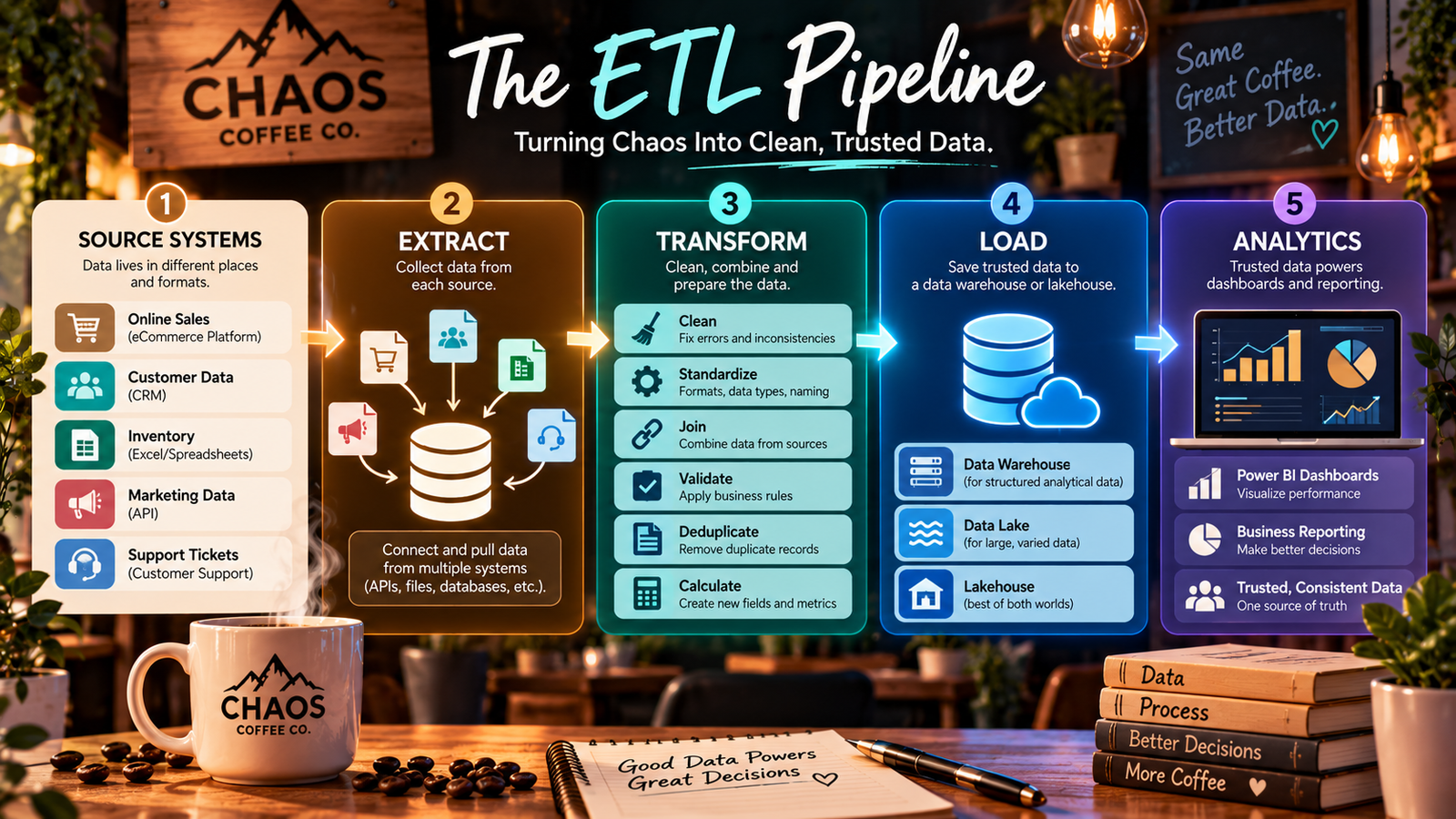
What Is an ETL Pipeline?
Now that we know what ETL does, there’s one more term you’ll see everywhere: ETL pipeline.
The difference is pretty simple.
ETL describes the process. An ETL pipeline is the repeatable system that moves data through that process.
You can think of the basic flow like this:
Data Sources → Extract → Transform → Load → Destination
Maybe you manually import an Excel file, clean it in Power Query, and load it into Power BI once. You’ve performed ETL.
But what if that data needs to refresh every morning?
Or every hour?
Or automatically whenever new data becomes available?
Now we’re talking about a pipeline—a repeatable flow designed to move data from its source to wherever it needs to go.
And because no respectable data article should make it this far without inventing a fictional coffee company, meet Chaos Coffee Co. ☕
Meet Chaos Coffee Co.
Chaos Coffee is doing pretty well.
Maybe a little too well.
Its business data now lives everywhere:
Shopify holds online sales.
A CRM contains customer information.
An Excel spreadsheet tracks inventory.
A marketing API provides campaign data.
A support platform contains customer service tickets.
Management wants a Power BI dashboard showing sales, inventory, marketing performance, and customer behavior.
There’s just one problem.
None of that data is actually together.
So Chaos Coffee needs a pipeline.
The pipeline might automatically:
Extract sales, customer, inventory, and marketing data from those different systems.
↓
Transform the data by fixing formats, removing duplicates, matching customer records, validating values, and applying business rules.
↓
Load the trusted data into a warehouse or lakehouse where Power BI can use it.
Instead of someone manually collecting and fixing the same files every morning, the pipeline performs those steps repeatedly and consistently.
That’s the real power of an ETL pipeline.
It’s not simply about moving data from Point A to Point B.
It’s about creating a reliable path between the systems where your data originates and the systems where that data becomes useful.
ETL Process vs. ETL Pipeline
Here’s the distinction worth remembering:
ETL = what happens to the data.
ETL pipeline = the repeatable system that makes it happen.
And our little coffee company isn’t done yet.
Today, Chaos Coffee wants a Power BI dashboard.
Tomorrow, management is going to ask whether they can build an AI assistant that answers questions about sales, customers, inventory, and support trends.
Of course they are. 😂
And when they do, the quality and reliability of the data underneath that AI application will matter even more.
That’s why understanding ETL isn’t just useful for traditional reporting anymore.
It’s part of understanding the data foundation behind analytics, machine learning, and AI.
Why Raw Data Usually Isn't Ready for Analytics
If you’ve ever opened a spreadsheet and immediately thought, Who did this?—you already understand why ETL exists.
Raw data is rarely as clean as the dashboard makes it look.
In the real world, you might find:
Virginia,VA, andVa.all representing the same state.Dates stored as
10/01/2026,October 1, 2026, and2026-10-01.The same customer appearing three times.
Missing customer IDs.
Numbers stored as text.
Blank values that aren’t actually blank.
A column called
Customer_IDon Monday becomingCustomer IDon Tuesday.Transactions accidentally loaded twice.
And that’s before someone emails you FINAL_Sales_Report_v7_ACTUALFINAL.xlsx.
You know the one. 😂
Moving Data Isn’t Enough
This is why ETL isn’t simply about getting data from one place to another.
Before Chaos Coffee can confidently calculate revenue, compare marketing campaigns, monitor inventory, or analyze customer behavior, the data coming from those different systems needs to agree on what things actually mean.
That’s the Transform part of ETL—and it’s often where a huge amount of the real work happens.
Data may need to be:
Cleaned → Standardized → Validated → Joined → Deduplicated → Calculated
The goal isn’t necessarily to make the data perfect.
It’s to make it consistent, trustworthy, and usable for whatever comes next.
Because a beautiful Power BI dashboard built on unreliable data is still unreliable.
And an AI application doesn’t magically fix bad data either.
It can just help you make decisions from bad data much faster. 😬
GOOD DATA IN, BETTER DECISIONS OUT
ETL helps create the trusted layer between messy source data and the analytics or AI systems that depend on it.
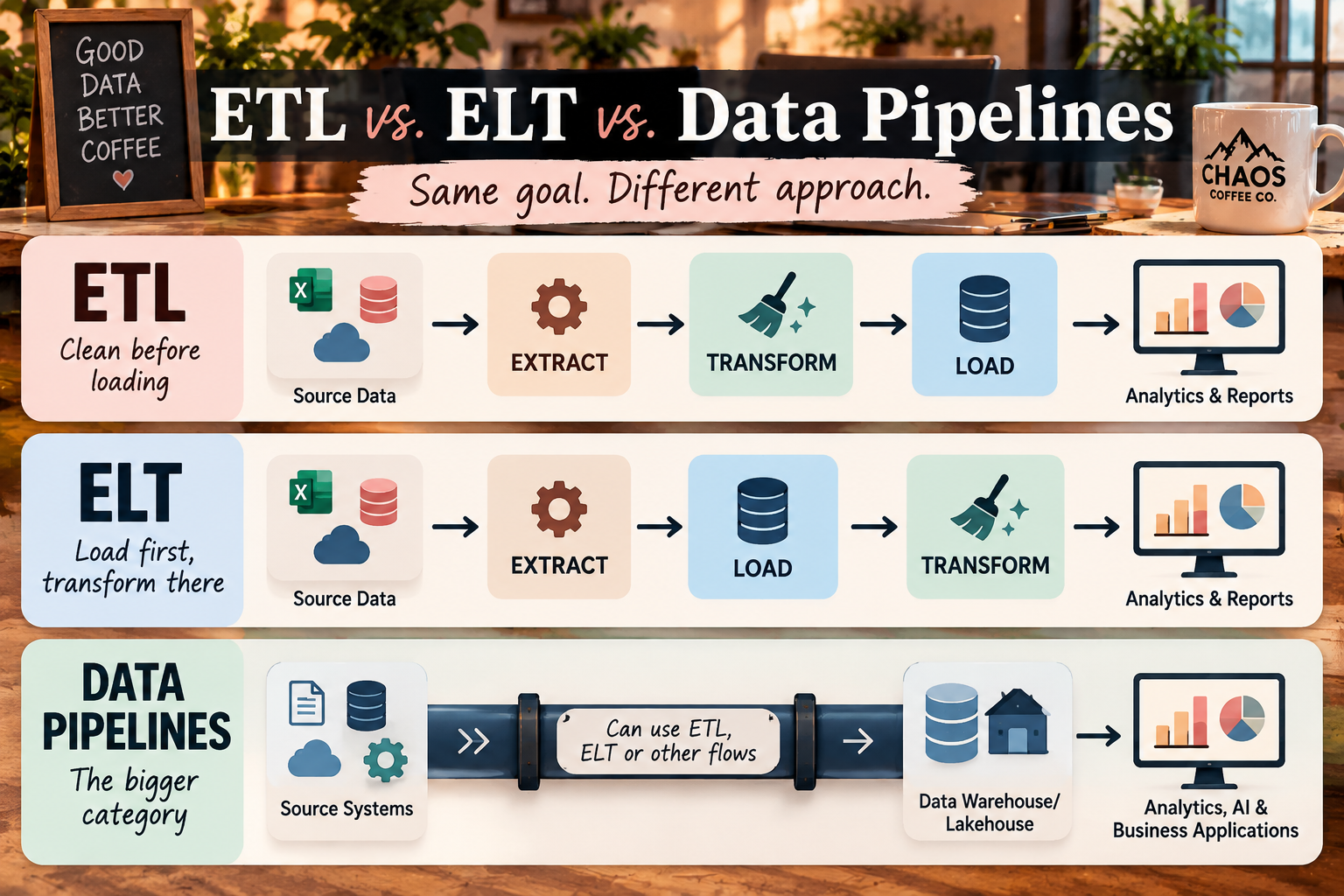
ETL vs. ELT vs. Data Pipelines
Once you start reading about ETL, it won’t take long before two more terms show up:
ELT and data pipeline.
They sound like three different concepts you now need to memorize.
Thankfully, they’re not.
ETL vs. ELT: Same Letters, Different Order
The biggest difference between ETL and ELT is exactly what the names suggest:
ETL: Extract → Transform → Load
ELT: Extract → Load → Transform
With ETL, we clean and prepare the data before loading it into its final destination.
With ELT, we load the raw data first and perform the transformations inside the destination, such as a cloud data warehouse or lakehouse.
That’s really the core distinction.
IBM’s ETL vs. ELT guide explains that both approaches move data from source systems to target systems; the difference is when and where the transformation happens.
Why Would You Load Messy Data First?
This was the question I had when I first started learning about ELT.
We just spent an entire section talking about how messy raw data is, and now you’re telling me we’re going to load it anyway?
Yep. 😂
Modern cloud platforms changed what’s possible.
Instead of requiring every transformation to happen before the data reaches its destination, organizations can store large amounts of raw data and use the computing power of modern warehouses and lakehouses to transform it there.
That also means the original raw data can remain available for other transformations and future use cases.
AWS’s comparison of ETL and ELT explains that ELT loads data into the destination first and then transforms it there, while traditional ETL prepares the data before loading it. Cloud infrastructure is one of the major reasons ELT has become so common.
Neither approach automatically makes the other obsolete.
The right architecture depends on the data, destination, security and governance requirements, infrastructure, and what you’re ultimately trying to build.
So Where Does a Data Pipeline Fit?
Here’s the easiest way to remember it:
A data pipeline is the bigger category. ETL is one type of data pipeline.
A data pipeline is the broader system responsible for moving data between systems.
It might use:
Extract → Transform → Load
or
Extract → Load → Transform
or a completely different sequence depending on what the data needs to do.
In fact, a pipeline doesn’t necessarily have to transform the data at all.
AWS’s data pipeline guide makes this distinction directly: an ETL pipeline is a specific type of data pipeline, while other pipelines may move data without transforming it or follow an ELT sequence instead.
So when you hear data pipeline, think:
The infrastructure that gets data where it needs to go.
When you hear ETL, think:
One specific way of getting it there—and making it useful along the way.
And if you’re thinking, Okay…so some of the stuff I’ve been doing in Power Query sounds suspiciously like data engineering now…
Exactly. 👀
Wait... Have You Already Been Doing ETL?
If you work in Excel, Power BI, or analytics, there’s a decent chance you’ve been doing ETL for years without calling it ETL.
Open Power Query and think about your normal workflow.
Have you ever:
Connected to an Excel file, database, folder, or API?
Changed column names or data types?
Removed errors or duplicate records?
Filtered rows?
Replaced missing or incorrect values?
Merged or appended tables?
Created calculated columns?
Loaded the cleaned data into Power BI?
Congratulations.
Extract. Transform. Load.
You were doing ETL. 🎉
Microsoft actually describes Power Query as a data transformation and preparation engine capable of performing ETL processing.
Power Query Is ETL Without Starting With Code
And this is one reason I think ETL is much less intimidating than it sounds.
Power Query gives analysts a visual interface for many of the same concepts used in larger data pipelines.
You’re still connecting to sources.
You’re still transforming data.
You’re still creating repeatable steps.
You’re still loading the result somewhere another system can use.
The tools may change as pipelines become larger or more complex—maybe you move into SQL, Python, cloud data platforms, or orchestration tools—but the fundamental thinking doesn’t suddenly disappear.
That’s an important distinction if you’re an analyst looking toward data engineering or AI.
You don’t necessarily need to throw away everything you know and start over.
You already understand more of the pipeline than you probably realized.
FROM ANALYST TO DATA ENGINEERING
Power Query → ETL concepts → SQL & Python → Data Pipelines → AI Data Engineering
It’s not a completely different road. It’s an extension of the one you’re already on.
How ETL Powers Analytics—and AI
For years, ETL has been closely associated with data warehouses, business intelligence, and reporting.
And that still matters.
At Chaos Coffee Co., our pipeline could take data from sales, customers, inventory, and marketing systems and turn it into trusted data for a Power BI dashboard.
The basic flow looks something like:
Source Systems → Data Pipeline → Trusted Data → Power BI → Decisions
The dashboard is the part everyone sees.
The data pipeline underneath is what makes the dashboard possible.
But now there’s another reason these concepts matter.
AI Has a Data Problem Too
AI applications still need data—and that data isn’t magically clean just because we’re calling it AI.
In fact, the information feeding an AI application may be even messier.
Instead of only dealing with structured information like:
SQL tables • CSV files • transactions • API data
we may also be working with:
PDFs • documents • emails • support tickets • knowledge bases • images
Those sources require their own preparation before an AI system can reliably use them.
For example, a modern RAG (Retrieval-Augmented Generation) pipeline might look something like this:
Documents → Extract → Parse → Clean → Chunk → Add Metadata → Create Embeddings → Vector Database → AI Application
That’s obviously more complicated than our original three little ETL boxes.
But look at what’s actually happening.
We’re still taking information from a source, preparing it for a specific purpose, and putting it somewhere another system can use it.
Sound familiar? 👀
ETL Didn’t Disappear. The Pipeline Evolved.
Traditional ETL and modern AI data pipelines aren’t identical, and we shouldn’t pretend they are.
But they solve a very familiar underlying problem:
Take messy source information and turn it into something a downstream system can reliably use.
That’s why understanding ETL gives you such a useful foundation for understanding modern data engineering and AI.
Once you understand how data moves through a pipeline, concepts like APIs, lakehouses, embeddings, vector databases, and RAG stop feeling like a collection of random technical buzzwords.
They’re different pieces of a larger story:
How do we get the right information, into the right shape, in the right place, so the next system can actually use it?
And whether that next system is a Power BI dashboard or an AI assistant, the quality of what comes out still depends heavily on the quality of what goes in.
ETL Is Only Three Letters. A Reliable Pipeline Is More.
Our Chaos Coffee pipeline looks wonderfully simple on paper:
Extract → Transform → Load
Then reality arrives on Tuesday morning.
Someone renames Customer_ID to Customer ID.
The inventory file doesn’t arrive.
An API returns zero records.
The pipeline runs twice and creates duplicate transactions.
Or everything technically runs successfully…but the numbers are wrong.
Welcome to data engineering. 😂
A production-ready pipeline needs more than the three ETL steps.
It also needs things like:
ETL + Validation + Error Handling + Logging + Monitoring + Orchestration + Lineage
In plain English:
Validation — Did we get the data we expected?
Error handling — What happens when something fails?
Logging — What happened during the pipeline run?
Monitoring — Is everything still working?
Orchestration — What runs, when, and in what order?
Lineage — Where did this data come from, and what happened to it along the way?
You don’t need to master all of those concepts to understand ETL.
But they’re what eventually separate:
“Hey! My pipeline worked!” 🎉
from
“This pipeline runs every morning without me touching it, and the business can actually depend on it.”
And that is where ETL starts becoming real data engineering.
Want the Shortcut? Grab the Free ETL Pipeline Cheat Sheet
We've covered a lot—but you definitely don't need to memorize all of it.
Common ETL Tools
Pick the tool based on the job
Analyst / Low-Code → Power Query + Dataflows
Code → Python + SQL
Cloud Pipelines → Azure Data Factory + AWS Glue + Google Cloud Dataflow
Data Movement → Airbyte + Fivetran
Orchestration → Airflow
Frequently Asked Questions About ETL
What does ETL stand for?
ETL stands for Extract, Transform, Load.
Extract means retrieving data from its original source, such as an Excel file, database, API, CRM, or SaaS application.
Transform means cleaning, validating, standardizing, joining, calculating, or otherwise preparing that data for use.
Load means moving the prepared data into its destination, such as a database, data warehouse, lakehouse, analytical model, or another system.
What is an ETL pipeline?
An ETL pipeline is a repeatable process that extracts data from one or more sources, transforms it into a usable format, and loads it into a destination.
The important word there is repeatable.
Instead of manually downloading, cleaning, combining, and loading the same data every morning, a pipeline can automate those steps so the data moves consistently from its source to wherever it needs to go.
What is the difference between ETL and a data pipeline?
A data pipeline is the broader system used to move data between systems.
ETL is one specific type of data pipeline that follows:
Extract → Transform → Load
Other pipelines may use ELT, stream data in real time, move data without transforming it, or include additional processing steps.
So:
Every ETL pipeline is a data pipeline, but not every data pipeline is an ETL pipeline.
What is the difference between ETL and ELT?
The primary difference is when the transformation happens.
ETL:
Extract → Transform → Load
The data is transformed before it reaches its final destination.
ELT:
Extract → Load → Transform
The raw data is loaded first and then transformed inside a data warehouse, lakehouse, or other destination.
Modern cloud platforms have made ELT increasingly common because they can store and process large amounts of data directly within the destination.
Is Power Query an ETL tool?
Yes.
Microsoft describes Power Query as a data transformation and preparation engine capable of performing ETL processing.
If you’ve used Power Query to connect to data, clean it, change data types, merge tables, create calculations, and load the result into Excel or Power BI, you’ve already worked with ETL concepts.
You may have been building ETL workflows long before anyone gave you the fancy acronym. 😉
Do you need Python to build an ETL pipeline?
No.
ETL pipelines can be created with low-code tools such as Power Query and Dataflows, cloud platforms such as Azure Data Factory, and dedicated data integration tools.
But Python becomes incredibly useful when you need more control over APIs, automation, transformations, validation, error handling, or custom workflows.
And that’s exactly where we’re going next.
Is ETL still relevant for AI?
Absolutely.
AI doesn’t eliminate the need for good data. If anything, it makes reliable data pipelines even more important.
Modern AI pipelines may include additional steps such as parsing documents, cleaning text, chunking content, adding metadata, generating embeddings, and indexing information in a vector database.
Those workflows aren’t identical to traditional ETL, but the underlying problem should sound familiar:
Take messy information from a source, prepare it for a specific purpose, and make it reliably available to another system.
Understanding ETL gives you a strong foundation for understanding the larger data pipelines behind analytics, machine learning, and AI.
You Already Know More About Data Engineering Than You Think
When we started this article, ETL probably sounded like one of those acronyms data engineers throw into conversations while everyone else quietly nods.
Now look at it again:
Extract → Transform → Load
Get the data.
Make it useful.
Put it somewhere it can do something.
That’s the foundation.
The tools get more sophisticated. The datasets get bigger. Pipelines become automated. Cloud platforms get involved. APIs break. Someone inevitably renames a column they absolutely promised they wouldn’t rename.
But the fundamental problem doesn’t really change.
How do we take messy information and turn it into trusted data that another system can reliably use?
That’s the thread connecting an Excel file cleaned in Power Query to a Power BI dashboard, a cloud data warehouse, a machine learning model, and even a modern AI application.
And if you’re an analyst looking at data engineering or AI and thinking, I don’t know enough to do that—look at the work you’re already doing.
If you’ve connected to data, cleaned it, joined it, transformed it, validated it, and built something useful from it, you’re not standing at the beginning of the road.
You’re already on it.
Now we’re just going to follow the data a little farther. ☕💻
What's Next: Let's Actually Build One
Understanding ETL is one thing.
Building a pipeline yourself is where everything starts to click.
So in the next article in our AI + Data series, we’re leaving Chaos Coffee Co. on the whiteboard and opening Python.
We’ll build a beginner-friendly ETL pipeline that:
Extracts data → transforms it with Python → validates it → loads the result → handles the inevitable chaos
No giant enterprise architecture.
No assumption that you’ve secretly been a data engineer for ten years.
And definitely no 47-step tutorial that breaks at Step 6 because the library changed three versions ago. 😂
Just a practical pipeline we can build together—and another step from analyst → data engineer → AI builder.
Next: Build Your First ETL Pipeline With Python →
And if you want something to keep next to your monitor in the meantime:
Keep the entire process handy with our free 2-page visual guide covering:
ETL • ETL vs. ELT • Common Transformations • Batch vs. Streaming • Production Pipelines • Analytics + AI