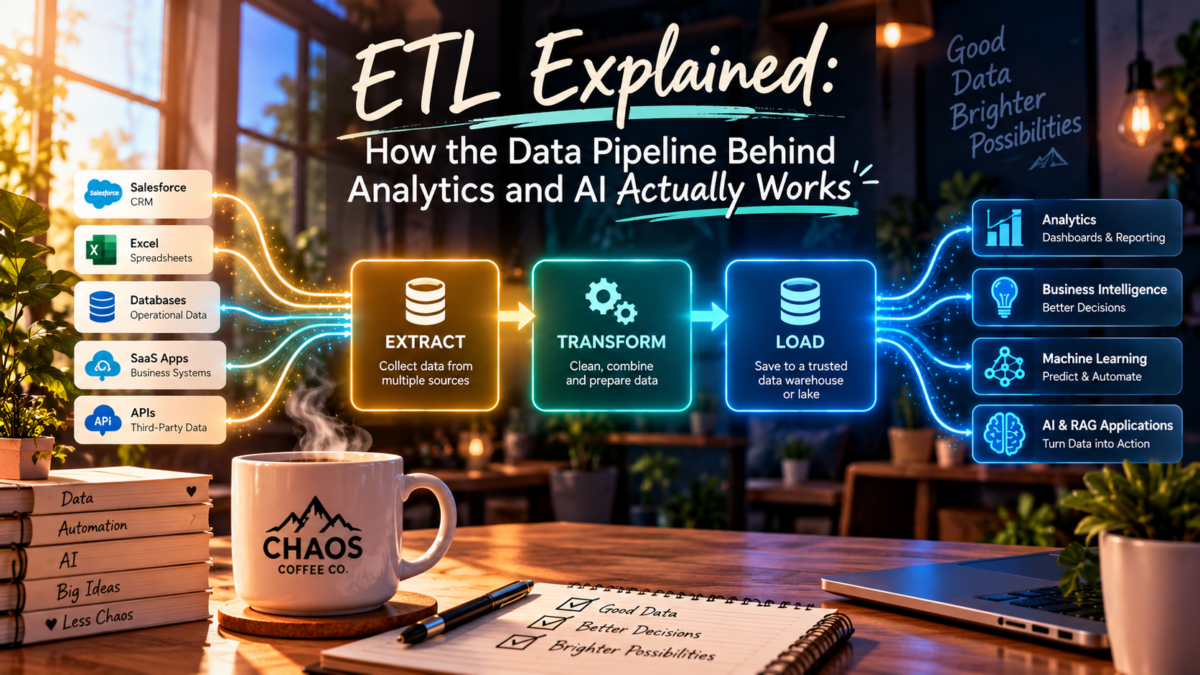
ETL vs. ELT vs. Dataflows: When Should You Use Each?
If you’ve spent any amount of time working with data, you’ve probably heard ETL and ELT tossed around like everyone was born knowing the difference.
Extract. Transform. Load.
Extract. Load. Transform.
Easy enough, right?
Except then somebody throws Power BI Dataflows into the conversation, another person starts talking about a lakehouse, somebody else insists everything belongs in SQL, and suddenly what looked like three simple letters has turned into an architecture meeting you never asked for.
Here’s the good news:
The decision is usually much simpler than it sounds.
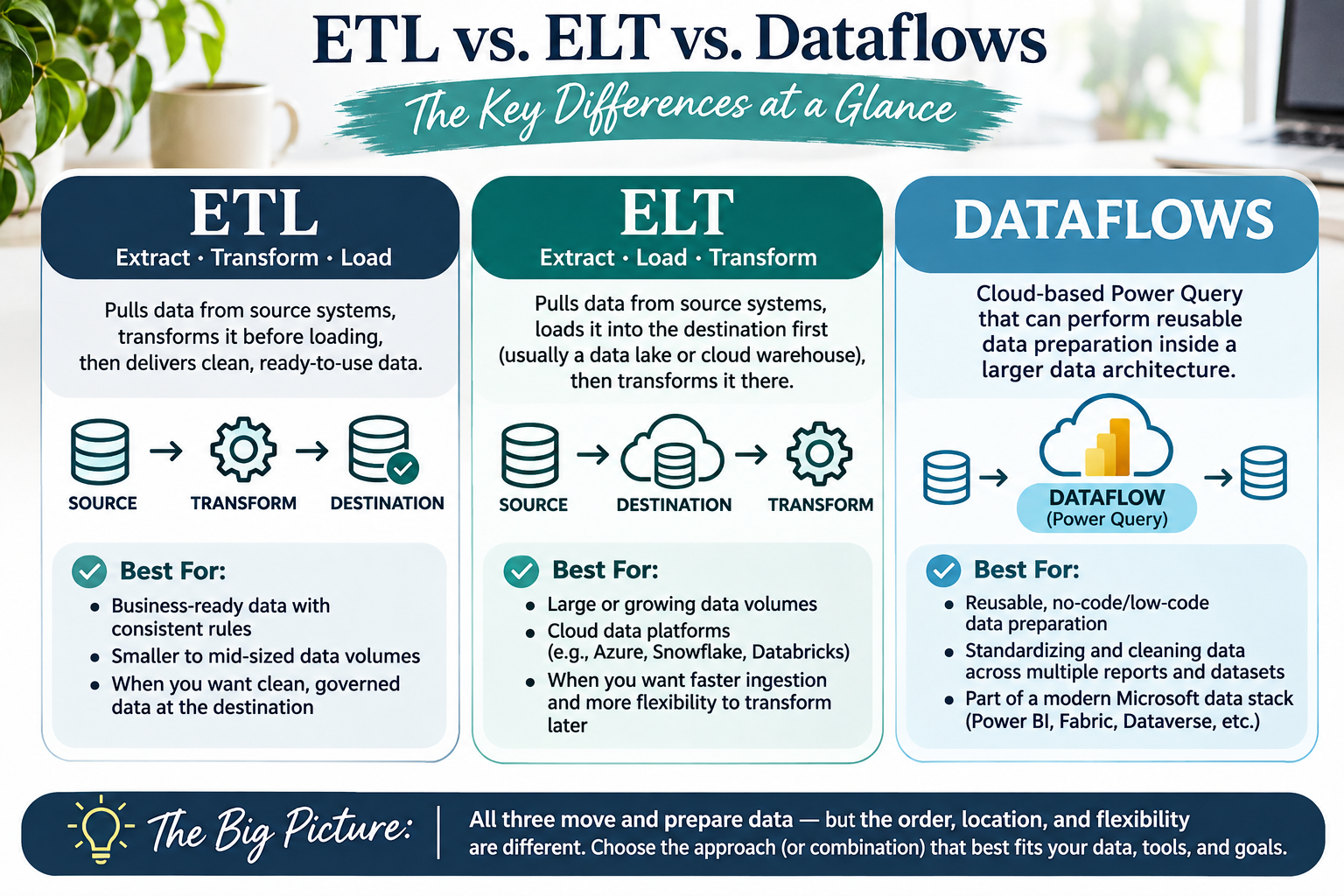
ETL and ELT describe when and where your data gets transformed. A Dataflow is a tool you can use to perform data preparation and transformation.
Once you understand that distinction, the whole conversation gets a lot easier.
In this guide, we’ll break down what ETL, ELT, and Dataflows actually do, where they fit into a modern data architecture, and—most importantly—how to decide which approach makes sense for your project.
Understanding the differences between ETL vs ELT vs Dataflows is essential for modern data management. With ETL vs ELT vs Dataflows, you can optimize your data workflows and ensure that your architecture is fit for purpose.
What Is ETL?
Extract → Transform → Load
The process looks something like this:
Source Systems → Transformation Layer → Destination
You first extract data from its original sources.
Those sources might include:
SQL databases
Excel files
APIs
SharePoint
CRM systems
ERP systems
Flat files
Cloud applications
Then you transform that data before loading it into its final destination.
Transformations might include:
Removing duplicates
Standardizing column names
Fixing data types
Filtering records
Joining multiple datasets
Applying business rules
Creating calculated fields
Cleaning inconsistent values
Only after those transformations are complete do you load the prepared data into your destination.
That destination could be a database, data warehouse, reporting environment, or another system.
Microsoft’s Azure Architecture Center describes ETL as an approach where data is transformed before being loaded into the target system.
The terms ETL vs ELT vs Dataflows can often create confusion, but recognizing their unique roles helps clarify your data strategy.
A Simple ETL Example
Imagine your company receives monthly sales files from 20 different locations.
Unfortunately, because data enjoys making our lives interesting, the files aren’t completely consistent.
One location calls a field:
Customer_ID
Another calls it:
CustomerNumber
And another apparently decided:
CustNum
was the obvious choice.
Before you can build reliable reporting, you need to standardize those fields, remove duplicates, correct data types, and combine the files.
With ETL, you perform those transformations before loading the final cleaned dataset into your reporting database or warehouse.
Your process might look like:
20 Excel Files
↓
Clean + Standardize + Combine
↓
SQL Database
↓
Power BI
The important part is this:
The transformation happens before the data reaches its final destination.
What Is ELT?
ELT uses the same three concepts but changes the order.
ELT stands for:
Extract → Load → Transform
Instead of transforming the data before loading it, you first move the raw data into a powerful destination such as a cloud data warehouse or lakehouse.
Then you transform it there.
The architecture looks more like:
Source Systems → Data Warehouse/Lakehouse → Transform
This approach has become increasingly common because modern cloud platforms can store enormous amounts of data and provide significant computing power for transformations.
According to Microsoft’s Azure Architecture guidance, ELT can be particularly useful when the target system is a modern warehouse or lakehouse with scalable compute, when you want to preserve raw data, or when transformations can take advantage of the target platform’s native capabilities.
When discussing ETL vs ELT vs Dataflows, it’s important to remember that each has its strengths depending on the environment in which they are used.
A Simple ELT Example
Imagine you’re collecting millions of transaction records from several applications.
Instead of transforming everything before it reaches your warehouse, you load the raw records first.
Your architecture might look like:
Applications + APIs + Databases
↓
Cloud Warehouse / Lakehouse
↓
SQL / Spark / Transformation Layer
↓
Analytics
The advantage is that you’ve preserved the original data.
If someone comes along six months later and says:
“Can we analyze something we weren’t tracking in the original reporting model?”
you may still have the raw data available.
And anyone who works in analytics knows that someone will eventually ask exactly that question.
ETL vs. ELT: What's the Actual Difference?
The easiest way to remember it is:
ETL transforms first.
Extract → Transform → Load
ELT loads first.
Extract → Load → Transform
That’s really the fundamental difference.
But choosing between them depends on your architecture.
ETL can make sense when you want tightly controlled, curated data before it enters the destination or when heavy transformations shouldn’t occur in the target system.
ELT becomes especially attractive when you’re working with a modern warehouse or lakehouse that already has the compute power to handle those transformations.
Neither approach is automatically “better.”
The right choice depends on:
- Data volume
- Destination architecture
- Transformation complexity
- Governance requirements
- Available tools
- Cost
- Performance
- Who needs access to the raw data
- How the data will eventually be used
And then there’s another option people often throw into this conversation:
Dataflows.
This is where things get slightly confusing.
The fundamental difference in ETL vs ELT vs Dataflows is the sequence of operations, which affects overall data processing efficiency.
So...Where Do Dataflows Fit?
Here’s the distinction that clears up a lot of confusion:
A Dataflow isn’t really a third alternative to ETL and ELT.
ETL and ELT describe data-processing patterns.
A Dataflow is technology you can use to implement data preparation and movement within your architecture.
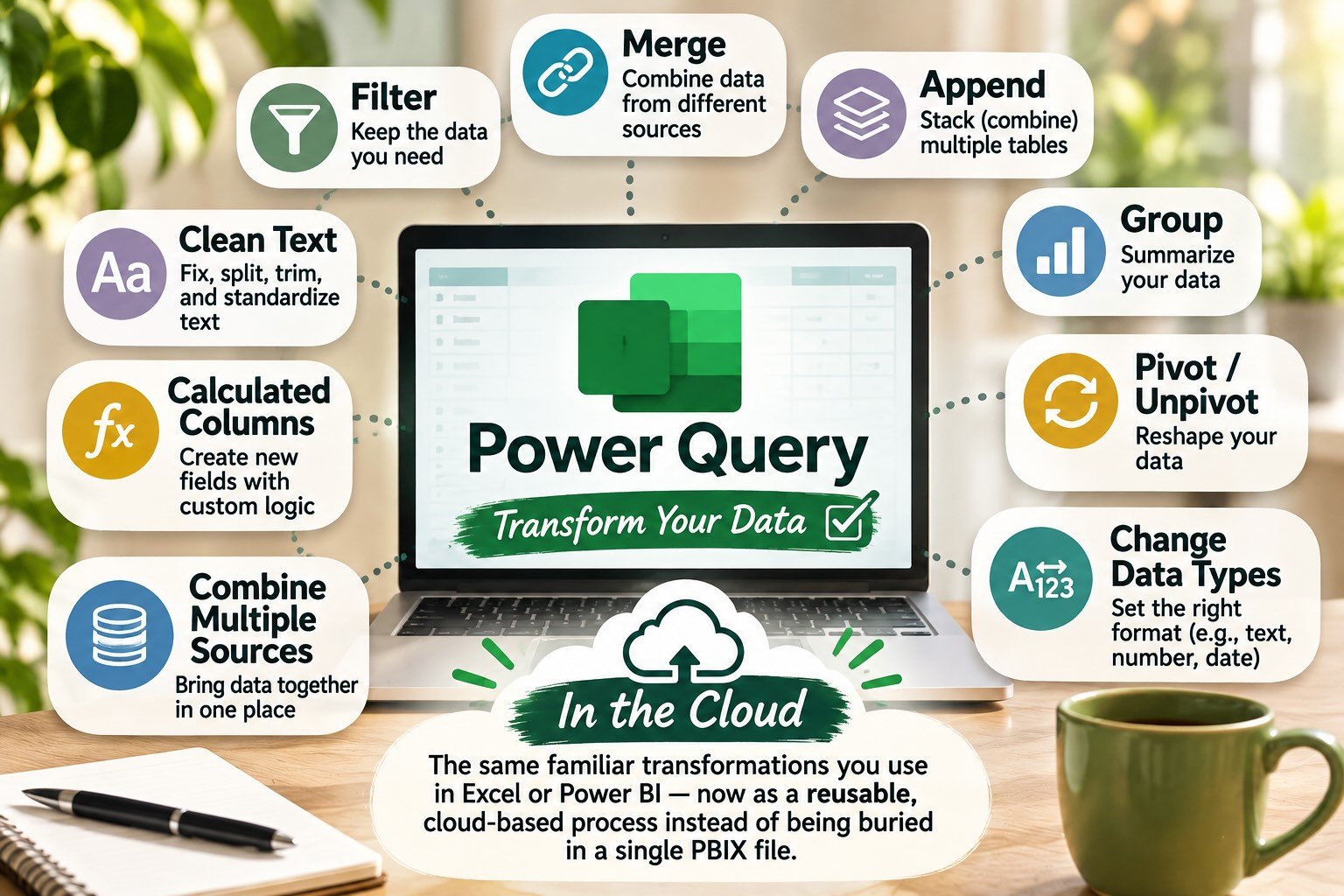
Microsoft describes Dataflows as a cloud-based Power Query experience for reusable data preparation.
If you’ve used Power Query in Excel or Power BI Desktop, the transformation experience will feel very familiar.
You can connect to data and perform transformations such as:
- Filtering
- Merging
- Appending
- Grouping
- Pivoting and unpivoting
- Changing data types
- Creating calculated columns
- Cleaning text
- Combining multiple sources
The major difference is that the transformation logic can live in the cloud instead of being buried inside one person’s PBIX file.
And that can be incredibly useful.
Integrating ETL vs ELT vs Dataflows into your strategy allows for a more streamlined data preparation process across various applications.
Why Dataflows Can Be So Useful
The combination of ETL vs ELT vs Dataflows has revolutionized the way organizations handle data, making flexibility and scalability paramount.
Let’s say you have three Power BI reports.
All three need the same customer data.
Without a reusable data-preparation layer, you might build essentially the same Power Query transformations inside all three PBIX files.
Now imagine a business rule changes.
Congratulations.
You potentially get to update it three times.
And hope nobody forgets Report #3.
With a Dataflow, you can move that reusable preparation logic upstream.
Instead of:
Source → Report A transformations
Source → Report B transformations
Source → Report C transformations
you can create something closer to:
Source
↓
Dataflow
↓
Prepared Customer Data
↙ ↓ ↘
Report A | Report B | Report C
Now multiple downstream solutions can reuse the prepared data.
That’s one of the reasons I like thinking about Dataflows as part of the data preparation layer, rather than treating them as simply another Power BI feature.
A Quick 2026 Dataflows Update
There’s one important thing to know if you’re building a new solution today.
Microsoft now considers Power BI Dataflow Gen1 a legacy technology that will not receive new feature investment.
For organizations using Fabric or eligible Premium capacity, Microsoft recommends Dataflow Gen2 for new and evolving workloads.
Dataflow Gen2 expands the original Dataflow concept with capabilities including multiple output destinations, improved monitoring, pipeline integration, high-performance compute, and newer development/deployment capabilities.
If you already have Gen1 Dataflows running successfully, that doesn’t mean you need to panic and rebuild everything tomorrow.
It does mean that if you’re designing a new architecture, you should understand where Microsoft is investing before automatically choosing the older approach.
ETL vs. ELT vs. Dataflows: Quick Comparison
| Question | ETL | ELT | Dataflows |
|---|---|---|---|
| What is it? | Data-processing pattern | Data-processing pattern | Data-preparation technology |
| Transformation happens | Before final load | After loading | Depends on architecture |
| Raw data preserved in target? | Not necessarily | Usually | Depends on destination |
| Good for cloud warehouses/lakehouses? | Yes | Excellent fit | Can be part of the architecture |
| Low-code option? | Sometimes | Sometimes | Yes |
| Uses Power Query? | Can | Can | Yes |
| Reusable transformations? | Yes | Yes | Yes |
| Cloud-based? | Can be | Usually | Yes |
And this is where we get to the question that actually matters.
You probably didn’t come here because you desperately wanted another definition of ETL.
You want to know:
In your planning, consider how ETL vs ELT vs Dataflows will impact your reporting capabilities and data integrity.
Which One Should I Actually Use?
And that depends on what you’re building.
CREATING FROM CHAOS · FREE RESOURCE
Stop Guessing. Start Building Better Data Pipelines.
Not sure whether your next project needs ETL, ELT, or a Dataflow?
Get the free five-page decision guide with a visual decision tree, real-world scenarios, and a practical architecture checklist.
GET THE FREE DECISION GUIDE
🔓 Want the Decision Guide?
Understanding the definitions is the easy part.
Choosing the right approach when you’re staring at Excel files, SQL databases, APIs, Power BI, Fabric, Dataverse, warehouses, lakehouses—and an actual deadline—is where things get interesting.
Subscribe free to unlock the rest of this guide, including:
✓ My ETL vs. ELT vs. Dataflows decision framework
✓ Six real-world project scenarios
✓ When I would—and wouldn’t—use a Dataflow
✓ Common architecture mistakes
✓ A downloadable ETL vs. ELT vs. Dataflows quick-reference guide
When Should You Choose ETL?
Evaluating ETL vs ELT vs Dataflows helps you make informed decisions that align with your business objectives and technical requirements.
ETL is a strong choice when you want the data cleaned, standardized, validated, or governed before it reaches the final destination.
I would consider ETL when:
- The destination shouldn’t receive raw data
- You have established business rules that need to be applied first
- The target system has limited transformation capacity
- You need a highly curated dataset
- Governance or compliance requirements require controlled staging
- You’re integrating systems where downstream users expect production-ready data
Example
You receive operational files from multiple business units.
Before anything enters your reporting database, you need to:
- Validate required fields
- Standardize department codes
- Remove duplicates
- Map statuses to approved values
- Reject invalid records
That’s a very natural ETL scenario.
When Should You Choose ELT?
ELT becomes particularly powerful when your destination is designed to do the heavy lifting.
Think:
- Cloud data warehouses
- Lakehouses
- Large-scale analytics platforms
- Environments where raw historical data has value
- Architectures supporting multiple future use cases
I would strongly consider ELT when:
- You’re dealing with large data volumes
- Your target platform has scalable compute
- You want to retain raw data
- Multiple teams may use the same source data differently
- Your analytical requirements may evolve
- SQL, Spark, notebooks, or other destination-side tools will handle transformations
Example
Your company collects:
- Website activity
- Customer transactions
- CRM data
- Application telemetry
- Marketing interactions
Instead of deciding upfront exactly which pieces you’ll eventually need, you land the source data in a lakehouse.
Different downstream processes can then transform that data for:
- Executive reporting
- Marketing analytics
- Machine learning
- Customer segmentation
- Operational dashboards
That’s where ELT starts becoming extremely attractive.
Understanding when to use ETL vs ELT vs Dataflows is key for achieving optimal performance in data processing and analysis.
When Should You Use a Dataflow?
I consider a Dataflow when the problem sounds something like:
“We’re repeating the same Power Query logic everywhere.”
or:
“This transformation shouldn’t live inside one report.”
or:
“We need a reusable low-code data preparation layer.”
Dataflows can be especially useful when:
- Multiple reports need the same prepared dataset
- Your team already knows Power Query
- You want cloud-based transformation
- You need scheduled refreshes
- Business analysts need to participate in data preparation
- You want to centralize transformations currently repeated across PBIX files
- You’re working inside the Microsoft ecosystem
The key word here is:
Reusable.
If five reports need the same transformation, I generally don’t want five independent versions of that logic if I can reasonably centralize it.
When Would I NOT Use a Dataflow?
By leveraging the strengths of ETL vs ELT vs Dataflows, businesses can achieve operational excellence and data-driven decision-making.
This part matters just as much.
Just because you can solve something with Power Query doesn’t mean you always should.
I wouldn’t automatically reach for a Dataflow when:
The transformation belongs in the warehouse.
If your enterprise warehouse already has governed transformation pipelines and established SQL logic, creating another transformation layer may introduce unnecessary complexity.
You’re processing extremely large or complex workloads.
There may be better tools for heavy engineering workloads depending on the architecture—particularly pipelines, SQL, Spark, notebooks, or other engineering services.
The logic is only needed once.
Reusable architecture is wonderful.
Overengineering is not.
If one small report needs one tiny transformation, building an entire reusable layer may solve a problem you don’t actually have.
You’re creating multiple sources of truth.
This is the one I care about most.
If Business Team A transforms Customer Status one way in a Dataflow while Engineering transforms it another way in the warehouse, you’ve created a governance problem—not solved one.
Architecture should reduce ambiguity.
Not multiply it.
Choosing between ETL vs ELT vs Dataflows should be based on a clear understanding of your data usage patterns and future needs.
Six Real-World Scenarios
Let’s make this practical.
Every month, 15 departments upload Excel files to SharePoint.
You need to:
- Combine them
- Standardize columns
- Remove bad records
- Apply business rules
- Feed Power BI
Scenario 1: The Monthly Excel File Nightmare
My starting point:
ETL, potentially implemented with Power Query/Dataflows depending on scale, governance, and your Microsoft environment.
The important requirement is that the messy source files become standardized before downstream reporting consumes them.
Scenario 2: Hundreds of Millions of Transactions
The integration of ETL vs ELT vs Dataflows facilitates efficient data handling and enhances the capability of your analytics.
You’re ingesting massive transaction tables into a modern cloud lakehouse.
Multiple analytical teams will eventually use the data.
My starting point:
ELT.
Land the raw data first.
Then let your scalable analytical platform handle the transformations.
You preserve flexibility without forcing every future analytical requirement into today’s ingestion pipeline.
Scenario 3: Three Power BI Reports Repeat the Same Power Query
You open three PBIX files and discover each contains 27 nearly identical Power Query steps against the same source.
You sigh.
Possibly loudly.
My starting point:
Evaluate a Dataflow.
Centralizing reusable preparation logic can make maintenance significantly easier.
Fix the transformation once instead of hunting through multiple reports.
Scenario 4: Your Warehouse Already Has Clean, Governed Tables
In summary, the choice of ETL vs ELT vs Dataflows should align with your organization’s goals and operational needs.
Your data engineering team maintains certified warehouse tables with established business logic.
A Power BI developer wants to recreate half of those transformations in a Dataflow.
My starting point:
Probably don’t.
Use the governed source unless there’s a legitimate architectural reason not to.
Duplicating transformation logic creates opportunities for inconsistent results.
As you consider your architecture, remember that ETL vs ELT vs Dataflows can work together to streamline your data pipeline processes.
Scenario 5: The Business Needs Low-Code Data Preparation
Your analytics team understands Power Query extremely well but doesn’t have a large engineering team available for every request.
Several reusable datasets need scheduled cloud-based preparation.
My starting point:
Dataflows deserve serious consideration.
You’re using a familiar transformation language while moving the logic out of individual desktop files.
Scenario 6: “We Might Need This Data Later”
You have a high-volume source and don’t yet know every analytical question the business will eventually ask.
Deleting unused fields during ingestion might make today’s model cleaner—but could remove information you’ll want later.
My starting point:
ELT.
Preserve the raw data first.
Transform it for specific analytical use cases afterward.
Future-you may be very grateful.
The Decision Framework I Actually Use
When I’m deciding how to approach a data pipeline, I don’t start with:
“Should I use ETL or ELT?”
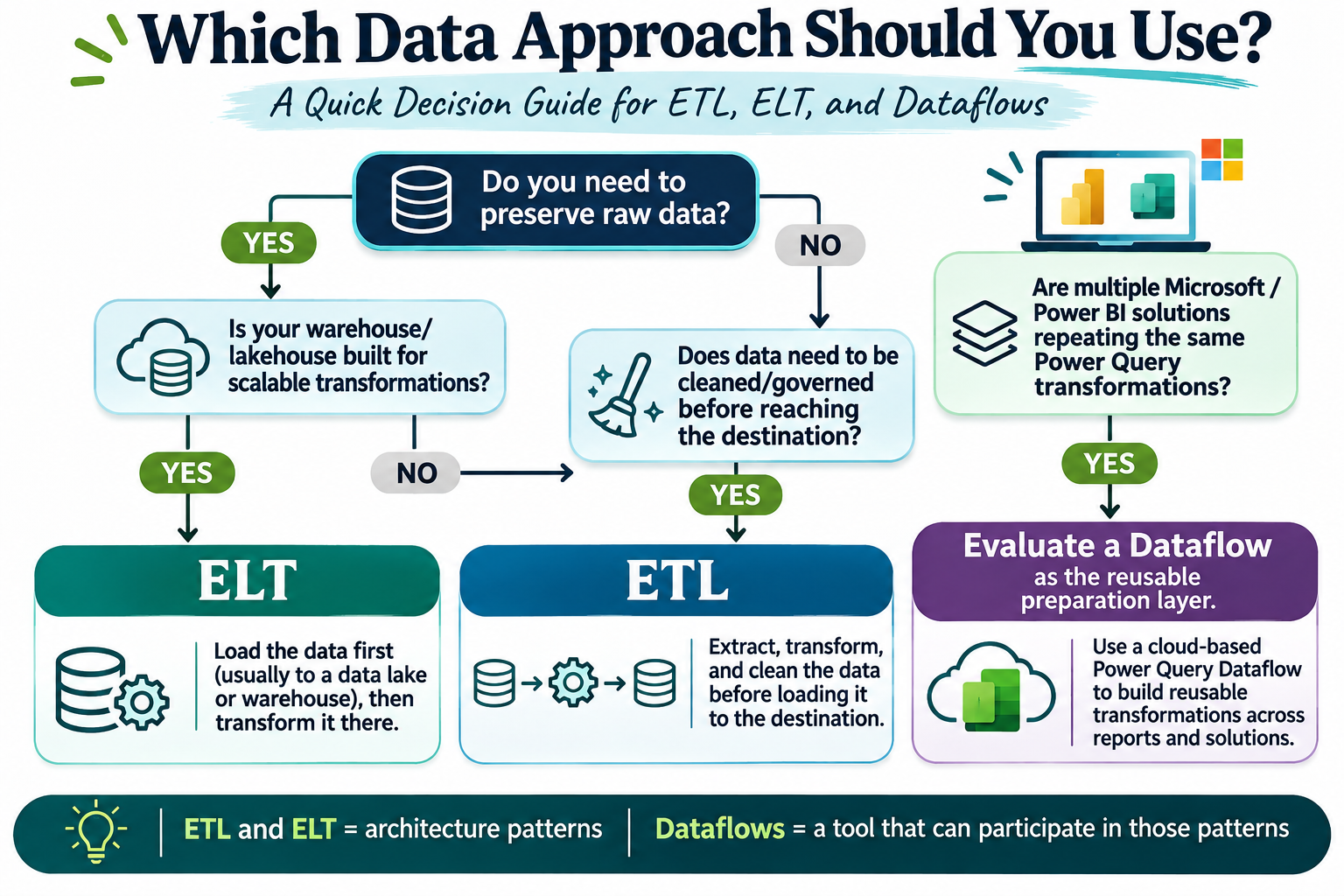
I start with questions.
1. Where does the data live now?
Files? APIs? SQL? SaaS applications?
2. Where is it going?
Power BI? Dataverse? Warehouse? Lakehouse? Operational application?
3. How much data are we talking about?
Ten thousand rows and 500 million rows are not the same architecture problem.
4. Do we need to preserve the raw data?
If yes, ELT becomes more attractive.
5. Where should the business logic live?
This may be the most important question.
Your transformations need an intentional home.
6. Who will maintain it?
A beautiful architecture nobody on the team can support isn’t particularly beautiful.
7. Will the transformed data be reused?
If multiple downstream solutions need the same preparation logic, centralization becomes much more valuable.
8. What is already governed?
Don’t rebuild trusted logic just because you discovered another tool capable of doing it.
The Biggest Mistake: Choosing the Tool Before the Architecture
This happens constantly.
Someone learns Power Query and suddenly everything becomes a Power Query problem.
Someone learns SQL and everything belongs in SQL.
Someone’s company buys Fabric and suddenly every project apparently requires a lakehouse.
Tools are important.
But the architecThe Biggest Mistake: Choosing the Tool Before the Architecture
ture should come first.
Ask:
Where should this transformation logically live?
Then choose the technology capable of implementing that architecture reliably.
That’s a much better question than:
“Which tool do I like using?”
ETL vs. ELT vs. Dataflows: The Simple Version
To wrap it up, remember that ETL vs ELT vs Dataflows are vital components of a modern data strategy that can change the way your organization operates.
If you remember nothing else from this article, remember this:
Choose ETL when:
You want to transform and curate the data before it reaches the final destination.
Choose ELT when:
You want to load the raw data into a powerful destination first and transform it there.
Consider Dataflows when:
You need reusable, cloud-based Power Query transformations, particularly within the Microsoft ecosystem.
And remember:
A Dataflow doesn’t replace the ETL/ELT decision.
It can be one of the tools you use to implement that decision.
Once you separate the architecture pattern from the technology, choosing between them becomes a whole lot easier.
Want the decision framework without rereading this entire article the next time someone schedules an “architecture discussion”?
Download the ETL vs. ELT vs. Dataflows Quick Reference Guide for:
- ETL vs. ELT comparison
- Decision tree
- Dataflow use cases
- Architecture questions
- Real-world examples
Ultimately, mastering ETL vs ELT vs Dataflows can position your organization for success in the complex landscape of data management.
Keep Learning
If this helped make ETL and ELT feel slightly less like alphabet soup, continue with:
→ ETL Explained: What Extract, Transform, Load Actually Means
→ Coming Next: Power Query vs. Dataflows — Where Should Your Transformations Live?
Because data architecture doesn’t have to be complicated just because the terminology makes it sound that way.
As a final note, keep in mind that the ongoing evolution of ETL vs ELT vs Dataflows will continue to shape data management practices moving forward.
Related Articles....

5 AI Tools to Skyrocket Engagement and Efficiency on your blog!
In the bustling digital age, carving out a unique space for your blog can be as challenging as it is rewarding. Whether you’re juggling life’s responsibilities or dedicating your heart and soul to your content, the journey of a blogger is one of constant evolution and growth. But fear not, as the digital world is brimming with tools designed to elevate your blog from a passion project to a thriving online community. This article unveils five indispensable tools that promise to revolutionize your blogging strategy, drive engagement, and unleash your creative potential. From automating social media posts with Tailwind to designing captivating graphics with Canva, we dive deep into each tool’s core objectives and how they can transform your blog into a magnetic hub for readers. Whether you’re looking to publish your first eBook, launch an online course, or simply streamline your content creation process, these tools are your allies on the path to blogging success. Join us as we explore how to harness the power of technology to not only manage but also enhance your blogging endeavors, ensuring your voice not only reaches but resonates with your audience.

Digital Marketing Analytics
The final installment of our AI in Digital Marketing series is a deep dive into the analytics that power successful digital campaigns and a look forward into the AI-driven future of marketing. Mastering Google Analytics, unraveling the nuances of A/B testing, and predicting future trends are no longer optional skills but essential ones. Part 5 provides you with a comprehensive guide to understanding and leveraging analytics for digital marketing success. With practical advice, useful links to resources, and an exploration of future AI trends, this post will equip you with the knowledge to navigate the complexities of digital marketing analytics and stay ahead in the fast-evolving digital landscape.